Streaming RubyLLM Responses with Turbo Streams
In episode 3 conversations started surviving a page refresh, but the request itself was still a black box: you hit Send, the whole page just sat there — no spinner, nothing — until the entire reply had come back from the model, and only then did the page redirect and show it, all at once. For a one-sentence answer that’s a second or two of nothing. For a longer one, it can be five, six seconds of a page that looks frozen.
This episode fixes that: the reply now types itself onto the page as the model generates it, token by token, without a full page reload. Along the way we’re also closing a TODO left over from episode 3 — there was no way to start a fresh conversation; session[:conversation_id] just kept the same one forever.
Code is tagged episode-4 in the ai-with-ruby-demo repo. Fair warning up front: this episode hit two real bugs while building it, and I’m leaving both in the post with the exact error messages and the exact reasoning that led to the fix — that debugging trail is arguably more useful than the final code on its own.
How RubyLLM streams a response, from the inside
Before touching any of our own code, it’s worth opening RubyLLM’s source and reading ask and complete, because everything we build in this episode leans on their exact behavior. Here’s the relevant part of chat_methods.rb, the module acts_as_chat mixes into Conversation:
def ask(message = nil, with: nil, &)
  add_message(role: :user, content: build_content(message, with))
  complete(&)
end

def complete(...)
  to_llm.complete(...)
end

def setup_persistence_callbacks
  return @chat if @chat.instance_variable_get(:@_persistence_callbacks_setup)

  @chat.before_message { persist_new_message }
  @chat.after_message { |msg| persist_message_completion(msg) }

  @chat.instance_variable_set(:@_persistence_callbacks_setup, true)
  @chat
end

def persist_new_message
  @message = messages_association.create!(role: :assistant, content: '')
end
Four things fall out of this that matter a lot for what we’re about to build:
askpersists the user’s message itself, synchronously, before doing anything else. If your own code also inserts a userMessagerow before callingask, you get two rows for one question — we’ll see exactly this mistake below.- The empty assistant message is created before any text exists.
persist_new_messageruns in abefore_messagecallback and creates aMessagewithcontent: ''. So by the time the model starts talking, there’s already a row in the database — with an id — waiting to be filled in. ask/completeaccept a block, and that block is RubyLLM’s streaming hook — it’s invoked once per chunk of text as the provider streams it back, well before the reply is complete.- The final content is written once, at the end, by
persist_message_completion, in anafter_messagecallback — a normalUPDATEon the same row that was created empty.
Put together: one .ask(content, &block) call creates two rows (user, then empty assistant), then calls your block repeatedly as chunks arrive, then does one final UPDATE with the complete text and the token counts. Nothing about persistence changes if you pass a block — the only thing a block adds is a callback fired per chunk. Streaming, in other words, isn’t a different code path; it’s the exact same ask we’ve used since episode 3, with a block attached.
The plan: a background job, not a slower controller action
The request/response cycle is fundamentally the wrong shape for this. An HTTP response has to finish before the browser can render it — you can’t dribble a Rails view out a few words at a time over a normal render. So the LLM call has to move off the request entirely, into a background job, and the job has to push each chunk to the browser through a side channel as it arrives. In a Rails 8 app, that side channel is Turbo Streams delivered over Action Cable — no separate JavaScript framework, no manual WebSocket wiring.
Rather than inventing this pattern by hand, I went to see how RubyLLM itself recommends doing it. The gem ships a generator, ruby_llm:chat_ui, built for exactly this. Running it with --pretend (nothing gets written to disk) against our own app, remapped to our actual model name:
bin/rails generate ruby_llm:chat_ui chat:Conversation --pretend
create  app/views/conversations/{index,new,show,_conversation,_form}.html.erb
create  app/views/messages/{_assistant,_user,_system,_tool,_error,_content,_form}.html.erb
create  app/views/messages/tool_calls/_default.html.erb
create  app/views/messages/tool_results/_default.html.erb
create  app/views/messages/create.turbo_stream.erb
create  app/views/models/{index,show,_model}.html.erb
create  app/controllers/conversations_controller.rb
create  app/controllers/messages_controller.rb
create  app/controllers/models_controller.rb
create  app/jobs/conversation_response_job.rb
insert  app/models/message.rb
 route  resources :conversations { resources :messages, only: [:create] }
 route  resources :models, only: [:index, :show] { collection { post :refresh } }
That’s a full multi-conversation CRUD scaffold — an index and a show page per conversation, a controller for browsing available Model records, views for tool calls and tool results (for a tool-calling episode we haven’t written yet). Our app deliberately isn’t shaped like that: since episode 3 there’s exactly one implicit conversation per browser session, no listing, no separate show page. Adopting the whole scaffold would mean rewriting the app’s shape to fit the generator, not the other way around.
So instead of running it, I read the templates and pulled out the three pieces that are actually about streaming, adapted to keep episode 3’s session-based, single-conversation design:
- A model concern that lets a
Messagebroadcast itself over Turbo Streams. - A background job that calls
askwith a block and forwards each chunk to the browser. - A controller that enqueues the job and gets out of the way immediately.
Making Message broadcast itself
# app/models/message.rb
class Message < ApplicationRecord
  acts_as_message chat: :conversation

  broadcasts_to ->(message) { "conversation_#{message.conversation_id}" }, inserts_by: :append

  def broadcast_append_chunk(content)
    broadcast_append_to "conversation_#{conversation_id}",
      target: "message_#{id}_content",
      content: ERB::Util.html_escape(content.to_s)
  end
end
broadcasts_to is Turbo Streams’ own ActiveRecord integration (from the turbo-rails gem, not RubyLLM), and it’s doing more than the one line suggests. Its actual definition, in turbo/broadcastable.rb:
def broadcasts_to(stream, inserts_by: :append, target: broadcast_target_default, **rendering)
  after_create_commit  -> { broadcast_action_later_to(stream.try(:call, self) || send(stream), action: inserts_by, target: target.try(:call, self) || target, **rendering) }
  after_update_commit  -> { broadcast_replace_later_to(stream.try(:call, self) || send(stream), **rendering) }
  after_destroy_commit -> { broadcast_remove_to(stream.try(:call, self) || send(stream)) }
end
So one call to broadcasts_to wires up three callbacks, not one:
- On create, append a rendered copy of the message into the stream, at
target:(defaulting tomodel_name.plural, i.e."messages"— the id of a container element the page needs to provide). - On update, replace the message’s own element (default target: itself,
dom_id(message)) with a freshly rendered copy. - On destroy, remove it.
That middle one matters a lot here, and it’s easy to miss on a first read: every time a Message row is updated — including the final persist_message_completion update that writes the complete text — the whole message bubble gets replaced with a fresh render. That’s a nice safety net: it means the very last update always overwrites whatever the incremental appends left behind with an authoritative, freshly-rendered copy from the database. It also means an incidental update (as we’ll see below) can trigger a broadcast you didn’t ask for.
broadcast_append_chunk is ours, not Turbo’s — it’s not appending a new message, it’s appending raw text into a message that already exists, targeting a specific inner <div> (message_#{id}_content) rather than the outer message container. ERB::Util.html_escape matters here: chunk content comes straight from the model, unescaped, and this is rendering raw HTML into the page — skip the escape and a reply containing < or & would corrupt the markup (or, worse, become an injection vector if the model ever echoed back something a user typed).
The background job
# app/jobs/conversation_response_job.rb
class ConversationResponseJob < ApplicationJob
  def perform(conversation_id, content)
    conversation = Conversation.find(conversation_id)
    assistant_message = nil

    conversation.ask(content) do |chunk|
      next if chunk.content.blank?

      assistant_message ||= conversation.messages.last
      assistant_message.broadcast_append_chunk(chunk.content)
    end
  end
end
This is almost the generator’s own job, with one deliberate change. The generator’s version calls conversation.messages.last inside the block, on every single chunk — a fresh SQL query per chunk, for a message that never changes across the whole call. We already know from the ask/complete walkthrough above exactly when that assistant message is created: in the before_message callback, which fires once, before the first chunk is ever yielded. So the row exists and its id is fixed before our block runs even once — there’s nothing to look up again after the first chunk. assistant_message ||= conversation.messages.last fetches it once and reuses the same in-memory record for every subsequent broadcast_append_chunk call.
chunk.content.blank? guards against chunks that carry metadata but no text (some providers stream a final chunk with usage stats and an empty content) — nothing to append, and nothing to broadcast.
The controller: enqueue, then get out of the way
# app/controllers/chats_controller.rb
class ChatsController < ApplicationController
  def new
    @conversation = current_conversation
  end

  def create
    ConversationResponseJob.perform_later(current_conversation.id, params[:message])

    respond_to do |format|
      format.turbo_stream
      format.html { redirect_to new_chat_path }
    end
  end

  def destroy
    session.delete(:conversation_id)
    redirect_to new_chat_path
  end

  private

  def current_conversation
    Conversation.find_by(id: session[:conversation_id]) || create_conversation
  end

  def create_conversation
    conversation = Conversation.create!
    session[:conversation_id] = conversation.id
    conversation
  end
end
The first version of this method I wrote also created the user’s Message row directly in the controller, before enqueuing the job — the mistake mentioned at the very top of this post. ask already does that internally, so the row I was adding by hand was a genuine second, duplicate user message for the same question. The fix was just deleting that line; ConversationResponseJob.perform_later is enough, since conversation.ask(content) inside the job creates it.
create no longer redirects on success. Episode 3’s Post/Redirect/Get pattern doesn’t disappear — it’s still there as the format.html fallback for a plain, non-JS request — but with Turbo doing its job, the request that submits the form gets a format.turbo_stream response instead, and the page itself never reloads. Everything the user sees afterward — their own message appearing, the assistant bubble appearing empty, the text typing itself in — arrives later, over the already-open Action Cable connection, not as part of this response.
destroy is the whole fix for episode 3’s leftover TODO: forget the conversation id in the session and go back to new, which creates a fresh one. Wiring it into the routes needed one word:
# config/routes.rb
resource :chat, only: [:new, :create, :destroy]
The turbo_stream response: clearing the form
<%# app/views/chats/create.turbo_stream.erb %>
<%= turbo_stream.replace "new_message" do %>
  <%= render "form" %>
<% end %>
This is the entire HTTP response body to a POST /chat now. It doesn’t touch the conversation or the messages at all — its only job is to swap in a fresh, empty form, so the textarea clears itself after sending. Everything else happens later, over the cable connection, from the background job.
The form itself got pulled into its own partial so this response (and the initial page) can both render it:
<%# app/views/chats/_form.html.erb %>
<div id="new_message">
  <%= form_with url: chat_path, method: :post, class: "flex flex-col gap-3" do %>
    <textarea
      name="message"
      rows="3"
      placeholder="Ask something..."
      class="border border-gray-300 rounded-md p-3 focus:outline-none focus:ring-2 focus:ring-indigo-500"
    ></textarea>

    <button
      type="submit"
      class="self-start bg-indigo-600 text-white px-4 py-2 rounded-md hover:bg-indigo-700"
    >
      Send
    </button>
  <% end %>
</div>
The id="new_message" on the wrapping div is what turbo_stream.replace "new_message" targets.
Bug #1: rendering messages by role, and a variable name that changes underneath you
Episode 3’s view looped over @conversation.messages by hand and branched on message.role inline to pick styling. That doesn’t work once other code — broadcasts_to — needs to render a Message on its own, without our view’s loop around it. So this episode moves rendering into partials, and render @conversation.messages uses Rails’ standard partial-per-record convention: for a Message, that would normally mean messages/_message.html.erb. I wrote exactly that partial first, and got this:
ActionView::MissingTemplate in Chats#new
Missing partial messages/_user with {locale: [:en], formats: [:html], ...}
Not _message — _user. The reason is in RubyLLM’s own Message concern, message_methods.rb:
def to_partial_path
  partial_prefix = self.class.name.underscore.pluralize
  role_partial = if to_llm.tool_call?
                   'tool_calls'
                 elsif role.to_s == 'tool'
                   'tool'
                 else
                   role.to_s.presence || 'assistant'
                 end
  "#{partial_prefix}/#{role_partial}"
end
RubyLLM overrides to_partial_path so a Message picks its own partial by role — messages/user, messages/assistant, and so on. That’s exactly why the official generator ships separate _user.html.erb, _assistant.html.erb, _system.html.erb, _tool.html.erb partials instead of one generic one: it has to, this override forces it. So the fix was renaming the file — messages/_user.html.erb and messages/_assistant.html.erb — not changing anything about the render call.
That fixed the missing-template error, but not the page. Reloading gave a different one:
NameError in Chats#new
undefined local variable or method 'user' for an instance of #<Class:0x...>
I’d written the partial expecting a local called message (the natural name, matching the variable everywhere else in this app):
<div id="<%= dom_id(message) %>" class="text-right">
  ...
But when Rails renders a partial resolved through to_partial_path, it names the local after the partial, not the class — for messages/_user.html.erb, that’s user, not message. I fixed the name and moved on, confident that was the whole story. It wasn’t.
Bug #2: the same partial, rendered two different ways, with two different local names
Everything looked right after that fix — until I actually sent a message and watched the live broadcasts (the ones fired by broadcasts_to, not the initial page render) blow up in the server log:
Error performing Turbo::Streams::ActionBroadcastJob ...:
ActionView::Template::Error (undefined local variable or method 'user' for an instance of #<Class:0x...>):
app/views/messages/_user.html.erb:2
Same error, same file — but the initial page render, moments earlier in the very same log, had worked fine with the exact same partial. Two different code paths were rendering messages/_user.html.erb with two different sets of locals. render @conversation.messages (a collection) infers the local’s name from the resolved partial path — user. But broadcasts_to’s after_update_commit callback (the one triggered by that incidental content_raw update inside add_message, mentioned above) calls broadcast_replace_later_to, which renders the same partial with an explicit locals: {message: ...} — the local is named after the model class, not the partial.
Same partial file, two callers, two different local variable names for the exact same object. The fix is a defensive first line, reading whichever one is actually present:
<%# app/views/messages/_user.html.erb %>
<% user = local_assigns[:user] || local_assigns[:message] %>
<div id="<%= dom_id(user) %>" class="text-right">
  <p class="text-xs text-gray-500 mb-1">user</p>
  <div id="<%= dom_id(user) %>_content" class="inline-block rounded-md px-3 py-2 bg-indigo-600 text-white">
    <%= user.content %>
  </div>
</div>
<%# app/views/messages/_assistant.html.erb %>
<% assistant = local_assigns[:assistant] || local_assigns[:message] %>
<div id="<%= dom_id(assistant) %>" class="text-left">
  <p class="text-xs text-gray-500 mb-1">assistant</p>
  <div id="<%= dom_id(assistant) %>_content" class="inline-block rounded-md px-3 py-2 bg-gray-100">
    <%= assistant.content %>
  </div>
</div>
This is exactly the shape of the fallback in RubyLLM’s own generated partial (assistant ||= local_assigns[:message]) — I hadn’t noticed why it was there until I hit the same wall myself. Reading generated code before you need it and reading it after it just broke your page teach very different lessons; this was the second kind.
The container the initial render @conversation.messages needs, and the one broadcasts_to’s create-time append (target defaults to model_name.plural, "messages") needs to find already on the page:
<%# app/views/chats/new.html.erb — excerpt %>
<div id="messages" class="space-y-4 mb-8">
  <%= render @conversation.messages %>
</div>
Bug #3 (the real one): two different names for the same stream
With both partials fixed, I reloaded, sent a message, and — nothing. No error anywhere. The form cleared (so the turbo_stream response from create had worked). But no user bubble, no assistant bubble, not even after several seconds, not even after the background job had clearly finished (I could see the full reply, correctly saved, by refreshing the page).
The Rails log told a completely clean story: the job ran, conversation.ask created both rows, every Turbo::Streams::ActionBroadcastJob performed successfully, and line after line of [ActionCable] Broadcasting to conversation_7: ... showed every single chunk going out, right down to the very last one. Server-side, everything worked. The browser just never got any of it.
I checked the page itself with a bit of JavaScript, from the browser console:
const el = document.querySelector('turbo-cable-stream-source');
el.hasAttribute('connected')   // true
el.subscription                // present
Connected, subscribed, no console errors — and still nothing arriving. At this point the two sides looked individually correct and mutually unreachable, which is exactly what happens when they’re each listening to / broadcasting on a different stream that merely looks the same to a human reading the code.
The subscription lives in the view:
<%= turbo_stream_from @conversation %>
I’d written this the way you’d write it if you’d only ever seen turbo_stream_from used with a plain ActiveRecord object — pass the record, done. And it is valid — turbo_stream_from accepts any “streamable”, including a model instance, and derives a stream name from it (based on its GlobalID). The problem is that @conversation was never the identifier used anywhere else in this episode. broadcasts_to and broadcast_append_chunk, back in the Message model, both build the stream name from a plain string:
"conversation_#{message.conversation_id}"
A string and a model object don’t hash to the same signed stream name just because a human reads them as “the same conversation.” turbo_stream_from @conversation and broadcasts_to ->(message) { "conversation_#{message.conversation_id}" } were quietly subscribing to and broadcasting on two entirely different channels — no error on either side, because neither side does anything wrong in isolation; they just never meet.
The generator’s own view template settled it for me — chats/show.html.erb.tt:
<%%= turbo_stream_from "<%= chat_variable_name %>_#{@<%= chat_variable_name %>.id}" %>
A string, built the same way as the model’s. Matching that:
<%= turbo_stream_from "conversation_#{@conversation.id}" %>
One line, and every broadcast that had been silently going nowhere started arriving instantly. The lesson underneath the bug: turbo_stream_from and broadcasts_to don’t have to agree on how you name a stream — object or string, doesn’t matter which — but every subscriber and every broadcaster absolutely have to agree with each other, exactly, because there’s no error path when they don’t. It fails by going quiet, not by raising.
The complete, working view:
<%# app/views/chats/new.html.erb %>
<div class="max-w-xl mx-auto mt-16 px-4">
  <div class="flex items-center justify-between mb-6">
    <h1 class="text-2xl font-semibold">RubyLLM chat demo</h1>
    <%= button_to "New conversation", chat_path, method: :delete, class: "text-sm text-gray-500 hover:text-gray-700" %>
  </div>

  <%= turbo_stream_from "conversation_#{@conversation.id}" %>

  <div id="messages" class="space-y-4 mb-8">
    <%= render @conversation.messages %>
  </div>

  <%= render "form" %>
</div>
Trying it in the browser
bin/dev
Open http://127.0.0.1:3000, ask something, and this time the reply doesn’t just appear — it fills in progressively, the way a chat app is supposed to feel. Here’s a real exchange from testing this episode, captured mid-session:
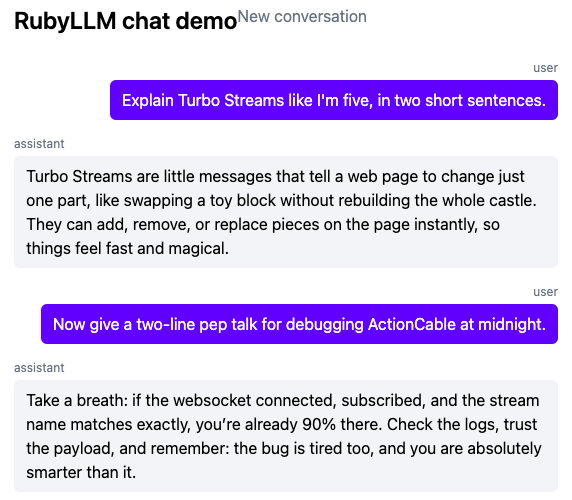
Unplanned, but fitting: I asked for a pep talk about debugging ActionCable, and the reply landed on “check that the stream name matches exactly” — the exact bug from the section above.
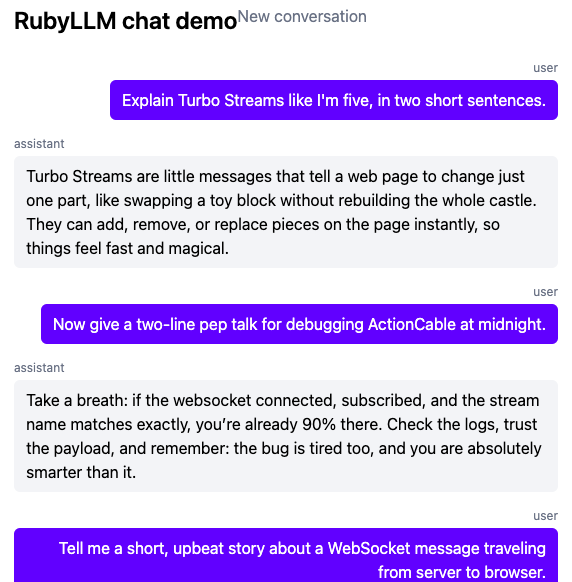
A longer session, showing the “New conversation” link (top right) that closes out episode 3’s TODO, and multiple exchanges accumulating in the same conversation:
A caveat worth knowing: broadcast ordering isn’t guaranteed
While capturing that second screenshot, I hit something worth flagging rather than quietly editing around. broadcasts_to’s after_create_commit callback doesn’t broadcast synchronously — it calls broadcast_action_later_to, which enqueues another background job (Turbo::Streams::ActionBroadcastJob) to do the actual rendering and broadcasting. So a single .ask call, under the hood, enqueues several jobs in quick succession: one to append the user message, one (from the incidental content_raw update) to replace it again, one to append the empty assistant message, plus one more at the very end to replace it with the finished text.
With Rails’ default :async queue adapter — a small in-process thread pool — these aren’t strictly guaranteed to finish in the order they were enqueued. In one live test I watched an assistant’s reply render before the user question it was answering, purely because that append job happened to finish on a different thread a few milliseconds sooner. Refreshing the page immediately showed the correct order — messages are always fetched with ORDER BY created_at, so the database is never wrong, only a specific live-updating page can briefly show things out of sequence. In production, with a real queue (Solid Queue, already configured in this app) this is far less likely to be visible at normal typing-and-reading speed, but it isn’t structurally impossible either. Not something this episode fixes — just something worth knowing is there if a message ever seems to jump the queue on screen.
What’s next
Episode 5 covers semantic search: turning Message content into embeddings, and letting a user search across past conversations by meaning, not just exact words.